
Invoice OCR & Scanning Software 4.7/5(124 reviews)Trusted by 10,000+ finance teams
Scan Any Invoice Into QuickBooks, Xero or Excel, With Every Total Checked
Drop in PDFs, photos, or emailed invoices. DocuClipper reads vendor, dates, tax, totals, and every line item from any layout at 99.9% field-level accuracy, flags any invoice whose numbers don't add up, and posts the rest as bills. No templates, no retyping.
4.7/5(124 reviews)Trusted by 10,000+ finance teams14-day free trialNo credit card required
Last updated:
What is the best OCR software for invoice processing?
Invoice OCR software reads a PDF or scanned invoice and returns structured fields: vendor, invoice number, dates, subtotal, tax, total, and line items. For invoice processing, the best OCR is the one that also checks the math and posts the result to your accounting system. DocuClipper reads any vendor layout without templates, flags invoices whose totals do not add up, and syncs to QuickBooks Online or Xero or exports Excel and QuickBooks Desktop IIF.
- Invoices processed
- 48,100 invoice and receipt documents (111,662 pages) in the 12 months to October 2026
- Jobs completed without error
- 99.4% of invoice conversion jobs in the same period
- Fields extracted
- Vendor, invoice number, invoice and due date, subtotal, tax, total, and line items (description, quantity, unit price, amount)
- Totals check
- Subtotal + tax = total, and line items sum to the subtotal. Invoices that fail are flagged and their sync pauses.
- Ways in
- Bulk upload (PDF, JPG, PNG), email forwarding, Google Drive, OneDrive, Dropbox, or Box folder watch, mobile app, REST API
- Where the data goes
- QuickBooks Online and Xero (native sync), QuickBooks Desktop (IIF), Excel (XLSX), CSV, JSON via REST API
- Price and trial
- From $29/month; 14-day free trial, no credit card
- Security
- SOC 2 Type II; encrypted in transit (TLS)
Volume figures: DocuClipper production data, October 2026.
Trusted by 10,000+ Accounting, Lending, and Finance Professionals










What DocuClipper invoice OCR does
- Reads digital PDFs, scanned PDFs, phone photos, and email-forwarded invoices.
- Extracts vendor name, invoice number, invoice and due dates, subtotal, tax, and total.
- Captures full line-item tables: descriptions, quantities, unit prices, and totals.
- Works across mixed vendor layouts without templates or training.
- Checks that subtotal + tax = total and that line items sum to the subtotal.
- Syncs to QuickBooks Online or Xero, or exports Excel, CSV, QuickBooks Desktop IIF, or JSON via API.
How invoice scanning works
Upload, extract, check, export, in seconds per invoice.
→
Upload or forward invoices
Add Documents, then Bills & Receipts (you pay). Drop PDFs or photos and click Convert. Email-in, folder watch, and API also work.
→
Recognize layout
Detects headers, totals, and line-item tables across any vendor format, no templates.
→
Extract and check
Captures vendor, invoice number, dates, subtotal, tax, and every line item, then checks that the totals tie out.
Export or sync
Download Excel or IIF, or sync to QuickBooks Online or Xero as bills. Approval rules can gate the sync.
Why accountants and AP teams scan invoices with DocuClipper
Built for accounting and AP workflows, not generic document OCR.
Line items, not just headers
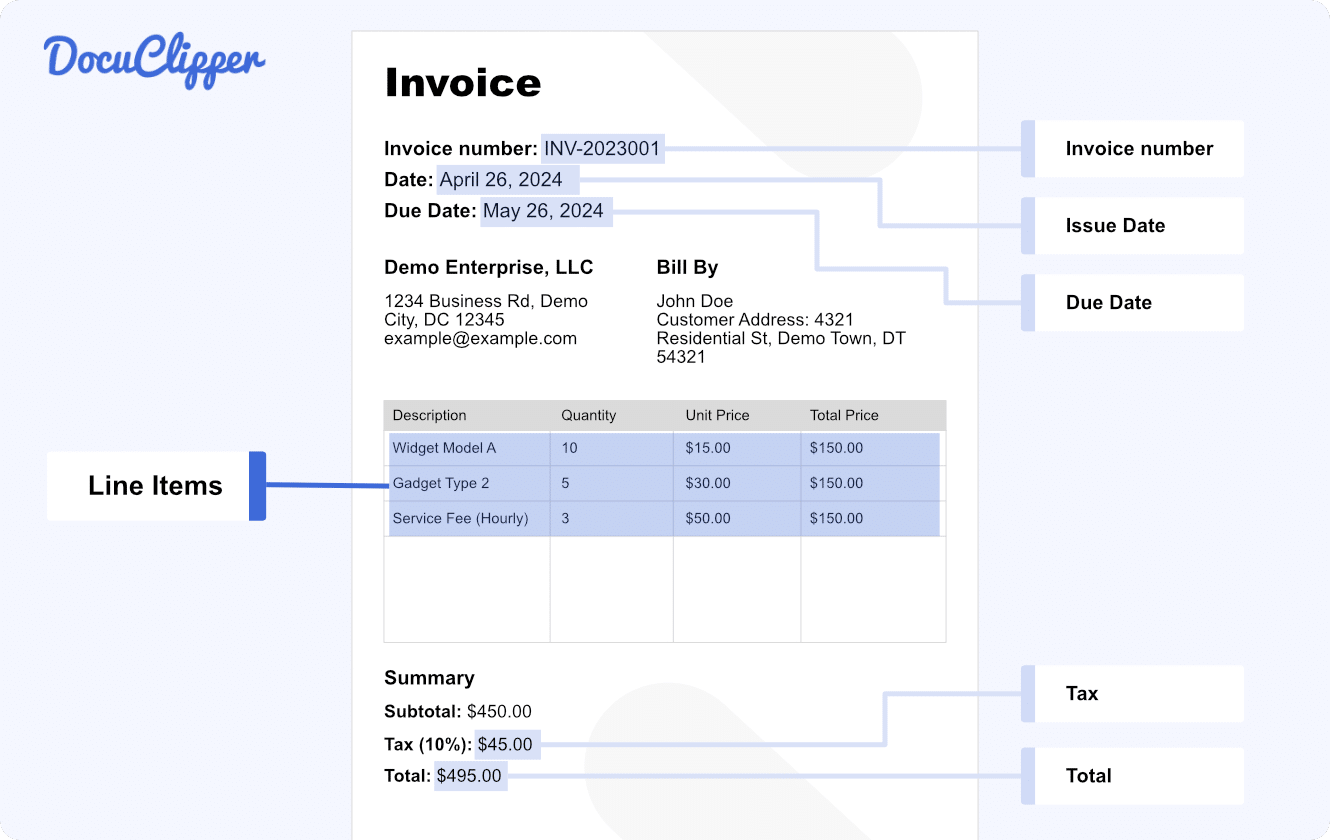
Captures full line-item tables, descriptions, quantities, unit prices, and row totals, not just header fields.
No templates required
Works on unseen vendor layouts out of the box. No per-vendor setup, no training data.
Totals check on every invoice
Subtotal + tax must equal the total and line items must sum to the subtotal. Mismatches are flagged and sync pauses.
Duplicate invoice detection
Flags an invoice when the same vendor and total (within $0.01) appear within 3 days of another one from the last 90 days.
Native QuickBooks and Xero
Scanned invoices post as bills with vendor mapping, account codes, and tax. QuickBooks Desktop IIF, Excel, CSV, and a REST API with webhooks too.
SOC 2 Type II
SOC 2 Type II audited. Documents are encrypted in transit (TLS), and every invoice keeps an activity history.
Every field, captured automatically
DocuClipper invoice OCR extracts header fields and line-item tables in one pass.
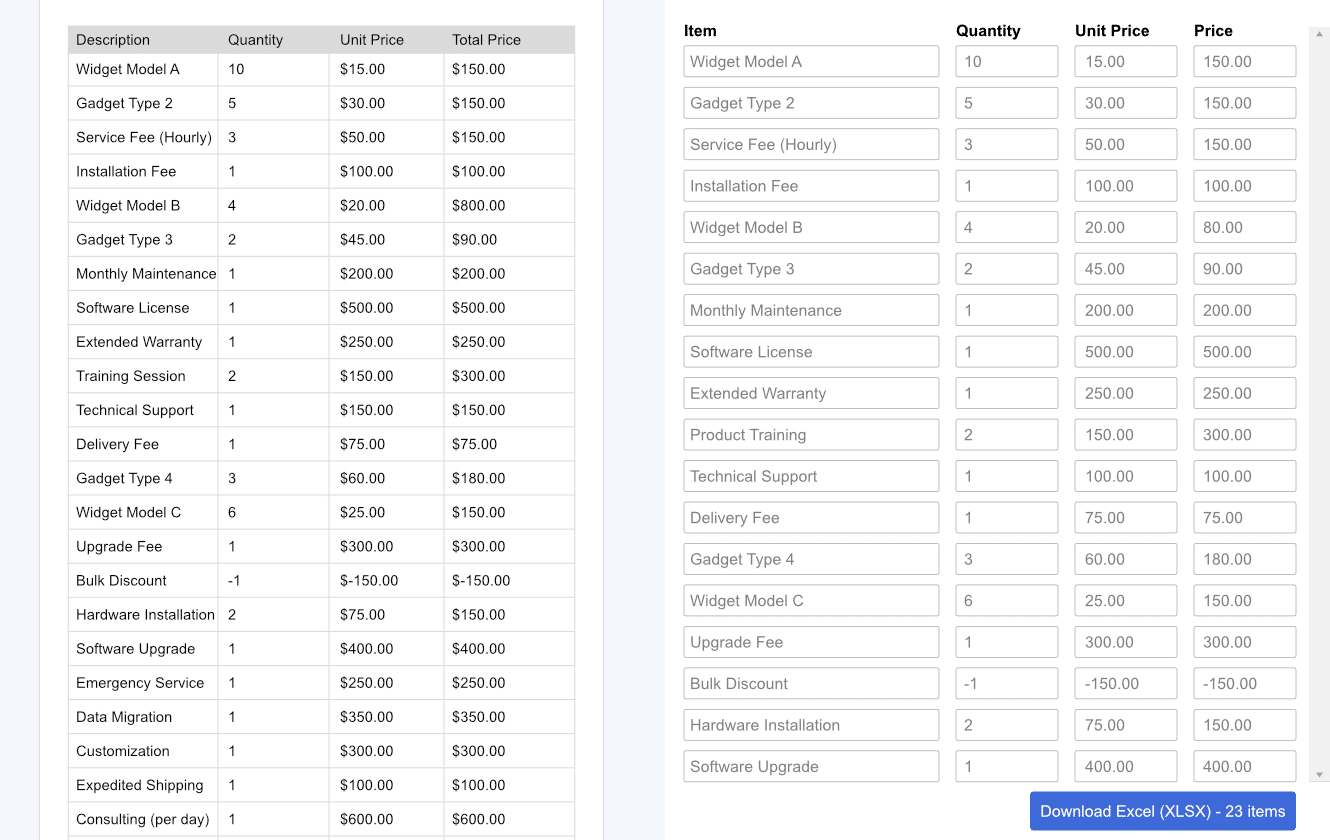
Line-item extraction, descriptions, quantities, and unit prices
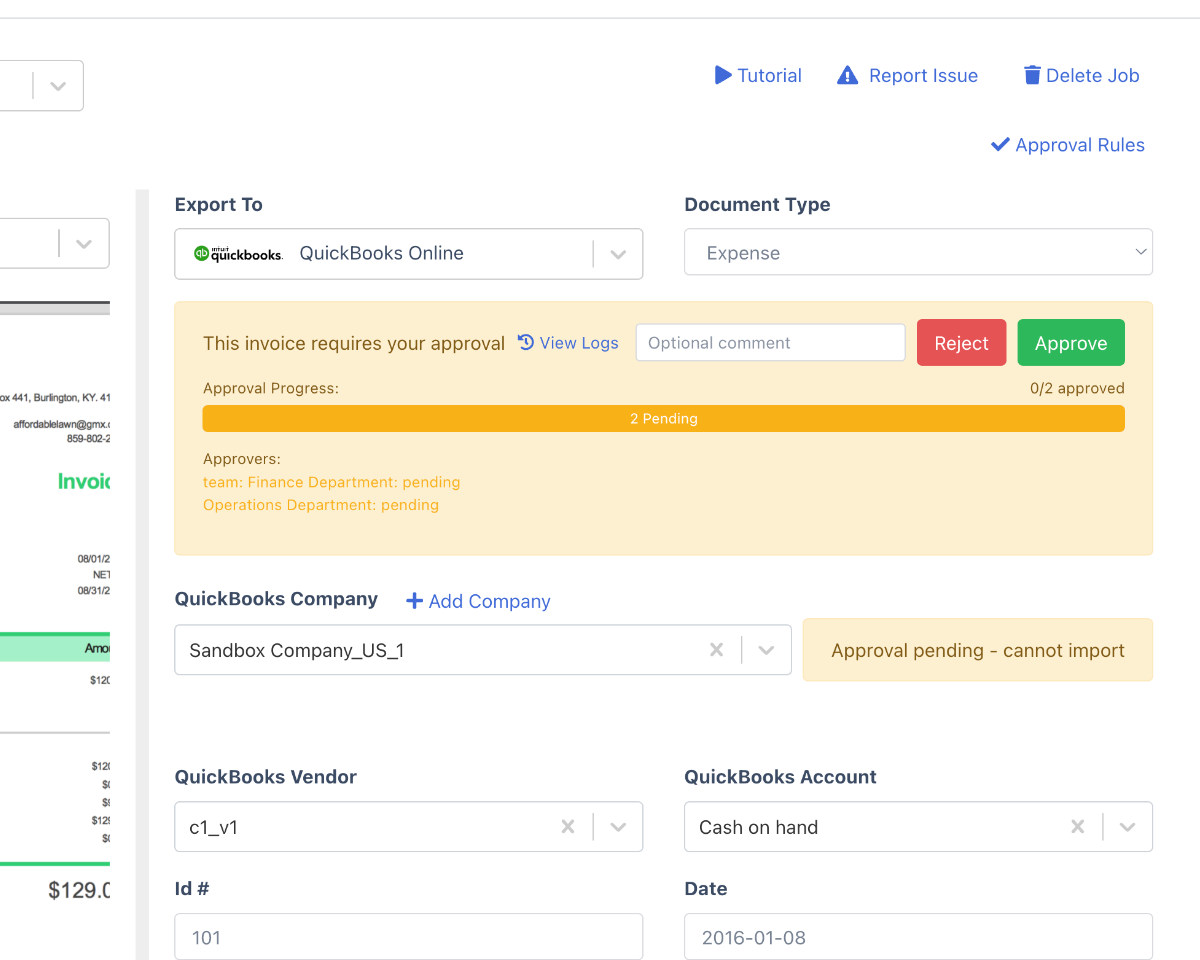
Send extracted data straight into approval routing
| Field | DocuClipper invoice OCR | Generic OCR tools |
|---|---|---|
| Vendor name & address | Structured fields | Raw text blob |
| Invoice number & dates | Structured fields | Often merged with text |
| Subtotal, tax, total | Validated & cross-checked | Extracted but not validated |
| Line-item table | Full rows with qty & price | Table cells lost or mis-aligned |
| Multiple vendor layouts | No templates needed | Template per vendor |
Who scans invoices with DocuClipper
Accounting firms & bookkeepers
- Scan client invoices in bulk, each client in its own project.
- Post to each client's QuickBooks or Xero with no per-client fees.
- Email-in or Drive-watch ingestion per client.
Accounts payable teams
- Eliminate manual invoice keying across hundreds of suppliers.
- Gate QuickBooks or Xero sync behind approval rules by vendor or amount (Business and Enterprise plans).
- Match scanned invoices to QuickBooks POs and bank transactions.
Finance teams & ERPs
- Feed invoice data to NetSuite, SAP, or any ERP through CSV or the REST API.
- Send header fields to a Google Sheet automatically.
- Catch invoices whose totals do not add up before posting.
What Customers Say
Real reviews from accountants, bookkeepers, and finance teams.
“DocuClipper has helped us eliminate several manual data entry processes, saving us a lot of time.”
KR
Kristin Mitchell
Accounting, United States
“It's a complete game-changer. Instead of spending hours combing through statements, we get the data we need almost instantly.”
MA
Matt
Lending, United Kingdom
“DocuClipper allowed us to enhance our advisory services, directly impacting our bottom line.”
SA
Sarah Winship
Accounting, United Kingdom
Ready to try it? Start your free 14-day trial, no credit card required.
Start free trialRelated features & workflows
Template-free invoice extraction
How DocuClipper reads any vendor invoice on first upload - no templates, no training.
Learn moreAP automation software
The full AP pipeline: validation, two-way PO matching, approvals, and export.
Learn moreInvoice approval software
Route extracted invoices through approval workflows before posting.
Learn moreBest invoice parser (guide)
How to evaluate invoice parsers for accuracy, line-item depth, and accounting integrations.
Learn moreAccounts payable OCR software (guide)
How OCR fits into an accounts payable workflow: capture, extract, code, and post.
Learn moreInvoice automation (guide)
What invoice automation covers end to end, from capture to posted bill.
Learn moreInvoice to QuickBooks
Import extracted invoice data into QuickBooks Online or Desktop.
Learn moreReceipt OCR
Extract merchant, total, tax, and line items from receipts.
Learn moreRunning a full AP process? Add duplicate detection, line-level PO matching to QuickBooks & Xero, and approval routing with AP Automation.
See AP Automation →Scan invoices to QuickBooks
Scan invoices to QuickBooks and Xero
Link a project to QuickBooks Online or Xero once and scanned invoices sync in as line-item bills with vendor, GL account codes, and tax. No exporting a CSV and re-importing: the scanned invoice becomes a bill in your ledger, and editing it later updates the same record. QuickBooks Desktop users download an IIF file instead.
Scan invoices to Excel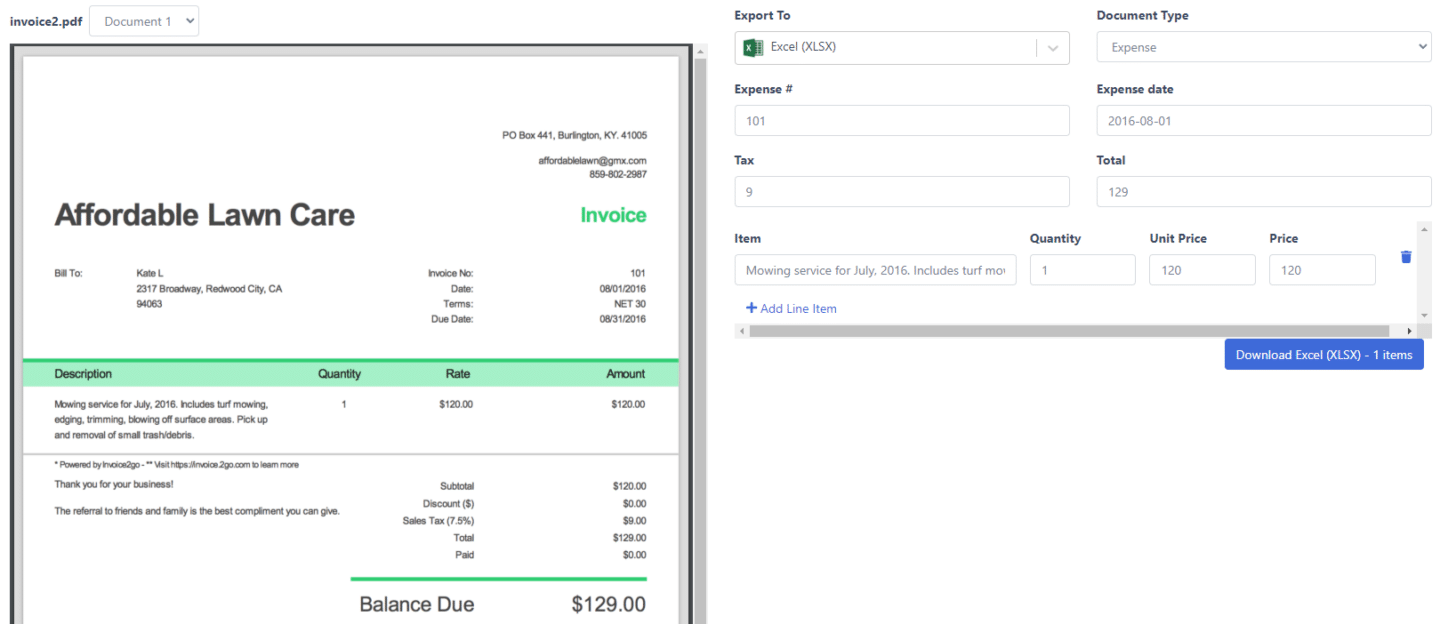
Scan invoices to Excel and CSV
Need the data in a spreadsheet instead of an accounting system? Download Excel (.xlsx) or CSV with header fields plus, if you want them, one row per line item (description, quantity, unit price, amount) in consistent columns. Bulk-scan a month of supplier invoices and download one workbook of all of them, ready for analysis or import into any downstream tool.
Bulk invoice scanning
Clear a month of invoices in one pass
Upload hundreds of invoice PDFs or images in a single batch and DocuClipper extracts them in parallel, then lists every result in one review screen so you approve and export in a single pass. Bookkeepers use it to clear client onboarding backlogs; AP teams use it to process a month of supplier bills at once. Email forwarding, watched cloud folders, and the REST API keep new invoices flowing in after that.
Push scanned invoices into your accounting platform
Step-by-step guides for the four most common destinations.
Import invoices into QuickBooks
Push scanned invoices to QuickBooks Online as line-item bills, or export for QuickBooks Desktop.
Import invoices into Xero
Post extracted bills to Xero with vendor mapping, account codes, and tax preserved.
Import invoices into Sage
Download invoice data as CSV or Excel and map it in Sage's own import.
Convert invoices to Excel
One XLSX or CSV for a whole batch, one row per invoice or per line item.
DocuClipper vs Manual Entry vs Dext vs Hubdoc
Dext and Hubdoc are solid capture tools. DocuClipper adds a totals check on every invoice, bank and credit card statement extraction in the same account, and page-based pricing with no per-client fees.
| Capability | DocuClipper | Manual entry | Dext | Hubdoc |
|---|---|---|---|---|
| Full line-item extraction (qty, unit price, line total, tax) | Yes | Manual typing | Yes (higher tiers) | Limited - header fields |
| No per-vendor templates to build | Yes | n/a | Yes | Yes |
| Field-level accuracy | 99.9% | Depends on the person typing | Varies by layout | Varies by layout |
| Math validation (line items → subtotal → total) | Yes - flags mismatches | No | No | No |
| Scan to Excel / CSV | Yes | Re-typing | Limited | No |
| Post to QuickBooks Online + Desktop | Yes - both | Manual entry | Yes | QBO only |
| Post to Xero | Yes | Manual entry | Yes | Yes (Xero-owned) |
| Also extracts bank + credit-card statements | Yes | Manual | Receipts/invoices only | No |
| Email-in, cloud folder watch, and REST API ingestion | Yes, all three | n/a | Email + fetch | Email + fetch |
| Pricing model | Page-based, unlimited users | Staff time | Per-client subscription | Free with Xero plan |
Competitor capabilities summarized from public product and pricing pages as of 2026. Dext and Hubdoc are trademarks of their respective owners. DocuClipper's 99.9% figure is field-level accuracy on typical vendor invoices. See the full Dext and Hubdoc comparisons.
DocuClipper vs Nanonets, Docparser, Rossum & Veryfi
Nanonets, Docparser, Rossum, and Veryfi are strong extraction engines, but most are developer/API-first data platforms. DocuClipper pairs no-template invoice OCR with a built-in totals check and native QuickBooks and Xero posting, so accountants and AP teams get usable, checked data without writing code or building parsing rules.
| Capability | DocuClipper | Nanonets | Docparser | Rossum | Veryfi |
|---|---|---|---|---|---|
| Reads unseen invoice layouts with no per-vendor templates or parsing rules | Yes - AI extraction | Yes (AI) | No - parsing rules per layout | Yes (AI) | Yes (AI) |
| Full line-item table (description, qty, unit price, line total, tax) | Yes | Yes | Rule/template dependent | Yes | Yes |
| Math validation - line items tie to subtotal + tax + total, mismatches flagged | Yes - built in | Not documented | No | Not documented | Not documented |
| No-code review screen for non-developers (side-by-side verify & correct) | Yes | Yes | Limited | Yes | API-first - build your own |
| Native accounting posting - bills to QuickBooks Online, QuickBooks Desktop (IIF), Xero | Yes - native | Via API / integrations | Via Zapier / webhook | Via API / integrations | Via API |
| File export: Excel (XLSX), CSV, QuickBooks Desktop IIF | Yes | CSV / API | CSV / API | API | API |
| Also extracts bank & credit-card statements and checks in the same account | Yes | Other doc types (varies) | Any text doc (rules) | Doc-type dependent | Receipts / bank via API |
| Pricing model | Flat page-based from $29/mo | Per-page / usage | Per-document tiers | Enterprise / quote | Per-document API |
Competitor capabilities summarized from public product and pricing pages as of 2026; “Not documented” means the capability is not stated as a standard feature on the vendor's public pages. Nanonets, Docparser, Rossum, and Veryfi are trademarks of their respective owners.
One invoice in, structured fields out
Here is a two-line supplier invoice and exactly what DocuClipper returns - every header field and every line-item row, with the math cross-checked before export.
Input - invoice PDF (example)
Northwind Supply Co.
Invoice #INV-20482 · Issued 2026-03-04 · Due 2026-04-03
2 × Steel bracket, 4in @ $18.50 = $37.00
10 × Hex bolt M8 @ $0.90 = $9.00
Subtotal $46.00 · Tax (8.25%) $3.80 · Total $49.80
Output - structured data DocuClipper returns
| Vendor | Northwind Supply Co. |
| Invoice number | INV-20482 |
| Issue date | 2026-03-04 |
| Due date | 2026-04-03 |
| Subtotal | $46.00 |
| Tax | $3.80 |
| Total | $49.80 |
| Description | Qty | Unit | Line total |
|---|---|---|---|
| Steel bracket, 4in | 2 | $18.50 | $37.00 |
| Hex bolt M8 | 10 | $0.90 | $9.00 |
Validation passes: $37.00 + $9.00 = $46.00 subtotal; $46.00 + $3.80 tax = $49.80 total. Any invoice whose math doesn't tie is flagged before it can post.
The same extraction in the DocuClipper review screen, ready to export to QuickBooks, Xero, or Excel.
Best OCR for invoice processing
What to look for in OCR software for invoice processing
Generic OCR converts images to text. Invoice OCR has to return structured data your accounting system can consume (vendor, dates, tax, line items) and prove it is right before export. Six things to check, and how DocuClipper handles each. For a ranked list of tools, see the best invoice scanning software comparison.
Line items, not just totals
Vendor, invoice number, dates, subtotal, tax, total, and every line item (description, quantity, unit price, amount) in one pass, at 99.9% field-level accuracy.
Reconciliation built in
Line-item totals must tie to invoice subtotal/tax/total before the invoice can post - bad math is flagged automatically.
No per-vendor templates
Reads invoices from vendors it has never seen before. Layouts vary; the model generalizes.
Bulk + automated ingestion
Process hundreds of invoices in one upload, or auto-ingest from email forwarding, a watched Google Drive, OneDrive, Dropbox, or Box folder, or the REST API.
Export-ready output
Native sync to QuickBooks Online and Xero with line items, QuickBooks Desktop IIF, Excel, or CSV. Not just raw text.
Audit-ready trail
Each invoice keeps an activity history, approval history, and a link to the record it created in QuickBooks or Xero.
AI invoice OCR
AI Invoice OCR
AI is what lets one OCR engine read invoices from vendors it has never seen. It recognizes vendor, totals, and line items by meaning rather than by position on the page, so there is no template to build when a new supplier sends an invoice.
- Generalizes across vendor layouts - no setup per vendor.
- Keeps working when a vendor redesigns its invoice template.
- Combines OCR with a totals check (line items sum to subtotal; subtotal + tax = total) so output is accounting-ready.
- Your categorization rules (by vendor or line description) code repeat invoices automatically.
AI vs template OCR
Template OCR (legacy)
Per-vendor field maps. Setup time per vendor. Breaks when vendors redesign their invoice. Maintenance never ends.
DocuClipper AI Invoice OCR
Reads any vendor invoice it has never seen. Zero per-vendor setup. Layout-change resilient. Rules you set apply to every future invoice.
OCR invoice scanning
Five ways to get invoices in
Invoices flow into the OCR pipeline however your team works today.
Email forwarding
Send any invoice to a dedicated inbox; OCR runs immediately.
Bulk PDF upload
Drop a folder of invoices in the browser; processed in parallel.
Cloud folder watch
New invoices in a watched Google Drive, OneDrive, Dropbox, or Box folder are converted automatically.
Mobile app
Photograph paper invoices with the DocuClipper iOS or Android app.
REST API
POST invoices programmatically from any system that touches AP.
Invoice OCR & scanning FAQs
Invoice OCR software reads invoice PDFs, scans, and photos and turns them into structured fields: vendor name, invoice number, dates, subtotal, tax, total, and the line-item table. Good invoice OCR also checks that the numbers add up and sends the result to accounting software such as QuickBooks or Xero, or to Excel.
Invoice OCR is the data-extraction step: it turns the PDF or image into structured fields. Invoice scanning is the whole workflow around it: get the invoice in, extract the data, review it, and send it to your accounting system. DocuClipper does both in one place, so the two terms describe the same product here.
The best OCR software for invoice processing is the one that gets invoice data into your books without retyping: it reads any vendor layout without templates, captures line items, checks the totals, and posts to your accounting system. DocuClipper does all four for QuickBooks Online, QuickBooks Desktop (IIF), Xero, and Excel, from $29/month with a 14-day free trial and no credit card. Developer-first engines (Veryfi, Nanonets) fit teams that want to build their own app on an API.
DocuClipper suits small businesses that want invoices in their books without building per-vendor templates. It captures header fields and line items at 99.9% field-level accuracy, checks every total, syncs to QuickBooks Online and Xero, and exports QuickBooks Desktop IIF, Excel, CSV, or JSON via API. Pricing starts at $29/month with a 14-day free trial and no credit card. Email forwarding and cloud folder watching are included; approval routing is on Business and Enterprise plans.
Accounting firms pick DocuClipper for page-based pricing that does not charge per client. It scans bills and receipts (PDF, JPEG, PNG, scans, mobile photos) at 99.9% field-level accuracy with no templates, keeps each client in its own project, and syncs to QuickBooks Online or Xero or exports QuickBooks Desktop IIF and Excel.
Yes. DocuClipper captures the full line-item table on each invoice - description, quantity, unit price, line total, and per-line tax - from single-page or multi-page invoices in any vendor layout. It cross-checks the math (line items sum to the subtotal; subtotal plus tax equals the total) and flags any invoice where the numbers don't tie out, so errors are caught before the data reaches your accounting system.
No. DocuClipper reads each invoice from scratch and adapts to the layout, including vendors it has never seen. There are no per-vendor templates to build or maintain, even when a supplier changes its invoice format.
PDF (digital or scanned), JPG, and PNG, including phone photos of paper invoices taken with the DocuClipper mobile app and invoices forwarded by email. Multi-page invoices and bulk uploads are supported. For scans, 300 DPI or better gives the best results.
DocuClipper extracts invoice fields at 99.9% field-level accuracy, and you do not have to take that on trust. Every invoice gets a totals check: subtotal + tax must equal the total, and the line items must sum to the subtotal. If the numbers do not add up, the invoice is marked "Numbers don't add up" and automatic sync to QuickBooks or Xero pauses until you fix it or click Sync anyway. Likely duplicates (same vendor and total within 3 days) are flagged too.
QuickBooks Online and Xero sync natively (bills, expenses, and sales invoices with line items). QuickBooks Desktop gets an IIF file. Every invoice can also be downloaded as Excel (XLSX) or CSV, sent to a Google Sheet through an automation (header fields), or pulled as JSON through the REST API. For ERPs without a direct connector, such as NetSuite or SAP, use the CSV export or the API.
Click Add Documents, choose Bills & Receipts (you pay), drop in the invoice PDF or photo, and click Convert. Open the invoice, then click Connect Integration in the Export & Sync bar and pick your QuickBooks Online company. From then on every invoice in that project syncs as a line-item Bill (or Expense) with vendor, account, and tax filled in, and a View in QuickBooks link. For QuickBooks Desktop, click Excel and set Output Format to QuickBooks Desktop IIF instead.
Yes. From the Invoices list click Download (or Excel inside an invoice), set Output Format to Excel, and pick XLSX or CSV. You get header fields (vendor, invoice number, dates, subtotal, tax, total) and, if you want them, one row per line item with description, quantity, unit price, and amount. Bulk-scan a folder of invoices and download a single spreadsheet of all of them at once.
Yes. Drop many PDFs into one upload, forward invoices to your project's email address, watch a Google Drive, OneDrive, Dropbox, or Box folder, or send them through the REST API. Results land in one Invoices view with tabs for Needs review, Exceptions, Needs approval, and Not synced. DocuClipper processed 48,100 invoice and receipt documents (111,662 pages) in the 12 months to October 2026.
Yes. Forward invoices to your project's DocuClipper address and they are scanned as they arrive. You can also connect a watched Google Drive, OneDrive, Dropbox, or Box folder, or send invoices through the API.
DocuClipper is SOC 2 Type II audited, and documents are encrypted in transit (TLS). Access is limited to the users on your account.