
Bank Statement OCR 4.7/5(124 reviews)Trusted by 10,000+ finance teams
Bank Statement OCR Software
DocuClipper reads PDF and scanned bank statements from any bank and extracts every transaction, running balance, and account detail automatically, with 99.9% accuracy. Export to Excel, QuickBooks, Xero, or CSV in seconds. No templates, no manual keying.
4.7/5(124 reviews)Trusted by 10,000+ finance teams14-day free trialNo credit card required
Trusted by 10,000+ Accounting, Lending, and Finance Professionals










What bank statement OCR extracts
- Every transaction row: date, description, debit amount, credit amount, and running balance.
- Account summary: account number, statement period, institution name.
- Opening and closing balances, reconciled against extracted transactions.
- Multi-page statements processed as a single continuous dataset.
- Works on digitally generated PDFs and scanned (image-based) statements.
- Handles any bank, any layout, no per-bank templates or configuration required.
How bank statement OCR works
From raw PDF to structured data in under 10 seconds.
→
Upload the PDF
Drag and drop any bank statement PDF, digital or scanned, single page or multi-page, one file or a bulk batch.
→
OCR reads every row
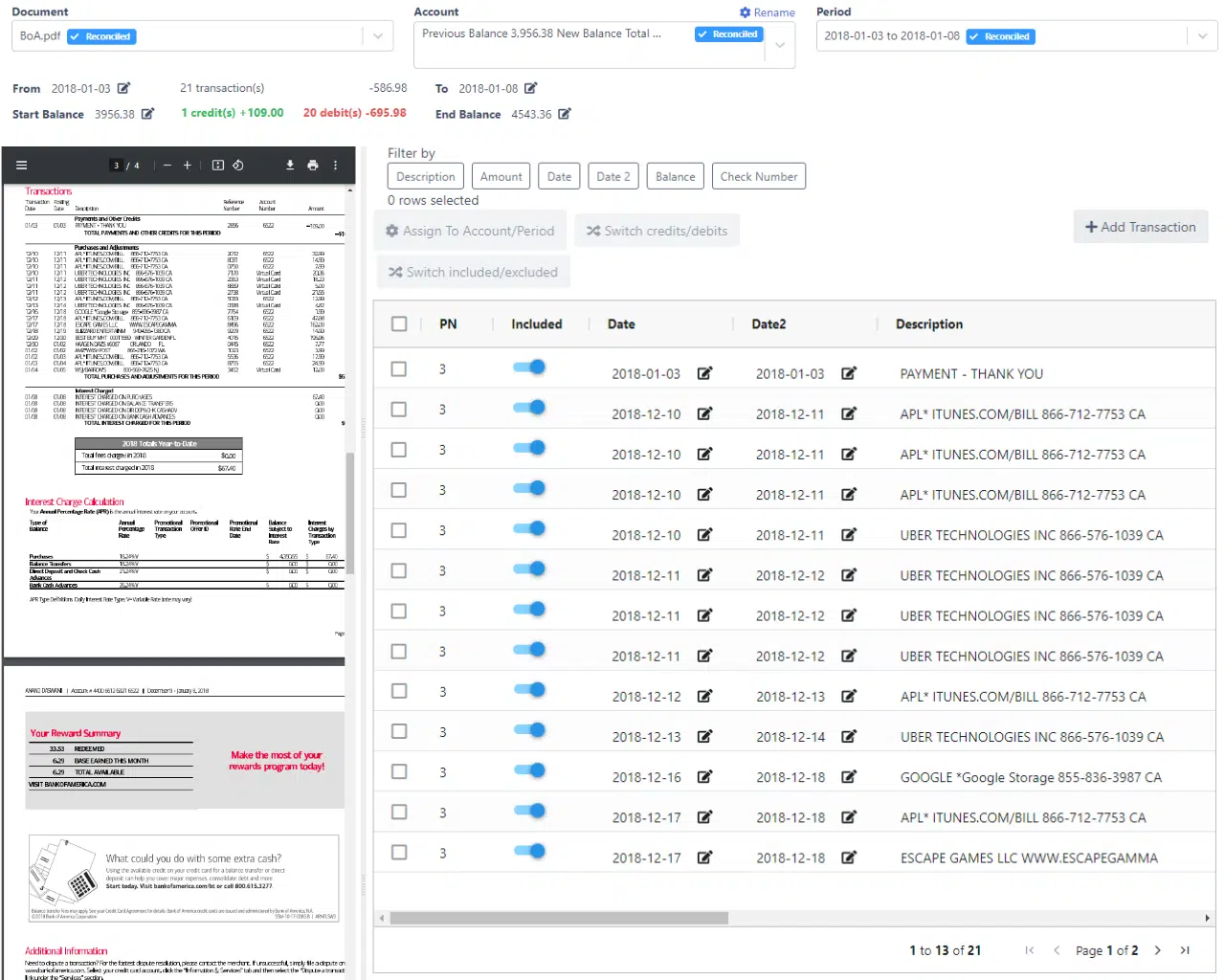
AI detects transaction tables, header rows, and balance lines across any bank layout. Every field is extracted, date, description, debit, credit, balance.
→
Balances reconciled
Extracted transaction totals are automatically checked against the statement's opening and closing balances. Discrepancies are flagged before export.
Export to your system
Download to Excel or CSV, import directly into QuickBooks (QBO) or Xero, or push structured JSON via API to any downstream system.
Why DocuClipper bank statement OCR
Purpose-built for financial statements, not generic document OCR.
Every bank, any format
Works across thousands of bank statement layouts, Chase, Bank of America, Wells Fargo, international banks, credit unions, without per-bank templates.
Scanned PDFs supported
Image-based statements from scanners or mobile apps are fully supported. AI OCR reads faded ink, skewed pages, and low-resolution scans.
Balance reconciliation built in
Every extraction includes an automatic reconciliation check: extracted transaction totals vs. stated opening and closing balances. Errors are caught before they reach your books.
Multi-page & multi-account
Handles 1-page to 200-page statements as a single continuous dataset. Combine multiple accounts into one normalized output for cash flow analysis.
99.9% extraction accuracy
Field-level accuracy across transaction rows, balances, dates, and descriptions. Validated on millions of real bank statement pages from hundreds of banks.
Accounting-ready export
Export directly to Excel, CSV, QuickBooks QBO, Xero, or Google Sheets. Or send structured JSON to any system via REST API or webhooks.
What bank statement OCR extracts
Every field, structured and ready for your accounting workflow.
| Field | Extracted from | Example value |
|---|---|---|
| Date | Transaction row | 03/15/2025 |
| Description | Transaction row | AMAZON MARKETPLACE PMTS |
| Debit amount | Transaction row | $142.50 |
| Credit amount | Transaction row | – |
| Running balance | Transaction row | $8,432.17 |
| Opening balance | Statement header | $9,200.00 |
| Closing balance | Statement footer | $7,850.62 |
| Account number | Statement header | ****4821 |
| Statement period | Statement header | Mar 1 – Mar 31, 2025 |
| Bank / institution | Statement header | Chase Bank |
All fields export as structured columns to Excel, CSV, QuickBooks, or your API, ready for reconciliation.
Who uses bank statement OCR
Accountants & bookkeepers
- Eliminate manual transaction keying from client bank statements.
- Import extracted transactions directly into QuickBooks or Xero for reconciliation.
- Process a month of statements for multiple clients in minutes, not days.
Lenders & underwriters
- Extract borrower transaction history from submitted bank statements automatically.
- Analyze cash flow, income deposits, and recurring obligations without manual review.
- Process loan application documents at scale without growing the ops team.
Forensic accountants
- Reconstruct financial activity from bank statement PDFs submitted in litigation.
- Trace transactions across multiple accounts and periods in a normalized dataset.
- Identify anomalies, gaps, and inconsistencies that indicate manipulation.
What Customers Say
Real reviews from accountants, bookkeepers, and finance teams.
“DocuClipper has helped us eliminate several manual data entry processes, saving us a lot of time.”
KR
Kristin Mitchell
Accounting, United States
“It's a complete game-changer. Instead of spending hours combing through statements, we get the data we need almost instantly.”
MA
Matt
Lending, United Kingdom
“DocuClipper allowed us to enhance our advisory services, directly impacting our bottom line.”
SA
Sarah Winship
Accounting, United Kingdom
Ready to try it? Start your free 14-day trial, no credit card required.
Start free trialRelated bank statement tools
Bank statement converter
The complete conversion workflow, PDF to Excel, QuickBooks, Xero, or CSV.
Learn moreBank statement to Excel
Export extracted transactions directly to Excel spreadsheets.
Learn moreBank statement to QuickBooks
Import transactions into QuickBooks Online or Desktop as QBO files.
Learn moreFraud detection software
Detect tampered statements, balance manipulation, and fraud signals.
Learn moreBank statement analyzer
AI-powered analysis for income verification, cash flow, and fraud screening.
Learn moreTransaction categorization software
Auto-categorize extracted transactions with rules and ML.
Learn morePer-bank extraction accuracy
Bank statement OCR is only useful if every transaction comes out right and ties back to the printed opening and closing balances. DocuClipper delivers 99.9% field-level accuracy on statements from the banks our customers upload most, and checks every statement against its balances before export.
Chase
Personal & business checking, credit card
99.9% accuracy
Bank of America
Checking, savings, credit card
99.9% accuracy
Wells Fargo
Consumer & business checking
99.9% accuracy
Capital One
360 Checking, Spark Business, credit card
99.9% accuracy
American Express
Personal & business cards, multi-page
99.9% accuracy
Citi
Checking, savings, credit card
99.9% accuracy
U.S. Bank
Personal & business checking
99.9% accuracy
PNC
Virtual Wallet, business checking
99.9% accuracy
TD Bank
Convenience Checking, business
99.9% accuracy
Truist
Consumer & small business
99.9% accuracy
USAA
Military checking, savings, credit card
99.9% accuracy
Navy Federal
Active duty checking, credit union
99.9% accuracy
Regions
LifeGreen Checking, business
99.9% accuracy
Fifth Third
Momentum Checking, business
99.9% accuracy
Huntington
Consumer & business checking
99.9% accuracy
Ally Bank
Online savings, interest checking
99.9% accuracy
Plus thousands of regional banks, credit unions, and international institutions, no per-bank templates required. The same OCR engine powers our bank statement converter and reconciliation engine.
How “reconciled” is defined
For every extracted statement, DocuClipper computes the sum of all extracted transactions and compares it to the printed closing balance minus opening balance. A statement reconciles when the delta is zero. Any statement that does not is flagged for review, so a missed transaction never slips quietly into your books.
Bank Statement OCR FAQs
Bank statement OCR software reads PDF bank statements, both digital and scanned, and extracts structured data from them: every transaction row (date, description, debit, credit, balance), account summary fields, and opening/closing balances. The extracted data can be exported to Excel, QuickBooks, Xero, or any other system.
Yes. DocuClipper supports both digitally generated PDFs and scanned (image-based) PDFs. OCR handles varying scan quality, skewed pages, faded ink, and mobile captures. No special scanner hardware or image preprocessing is required.
DocuClipper works across thousands of bank statement layouts worldwide, major US banks (Chase, Bank of America, Wells Fargo, Citi), regional banks, credit unions, and international institutions. No per-bank templates are required; the AI adapts to each layout automatically.
DocuClipper achieves 99.9% average extraction accuracy across transaction fields. Every extraction includes a built-in reconciliation check that verifies extracted transaction totals against the statement's stated opening and closing balances, flagging any discrepancy before export.
Yes. Multi-page statements are processed as a single continuous dataset, all transactions are extracted in sequence regardless of page count. Statements of 1–200+ pages are supported.
Excel (.xlsx), CSV, QuickBooks QBO (for QuickBooks Online import), QIF (for QuickBooks Desktop and Quicken), Xero-compatible CSV, and structured JSON via REST API.
Yes. Bulk upload, email ingestion, Google Drive monitoring, and API submission are all supported so you can process dozens or hundreds of statements in one batch.
Bank statement OCR is the underlying data-extraction technology, reading the PDF and turning it into structured rows. The bank statement converter (/) combines OCR with reconciliation, export formatting, and accounting-system integration. DocuClipper provides both.