
Document Fraud Detection Software 4.7/5(124 reviews)Trusted by 10,000+ finance teams
Document Fraud Detection Software for Financial Documents
Catch altered bank statements, invoices, and pay stubs. DocuClipper checks each PDF's edit history and metadata, looks for pasted-in amounts, fingerprints bank statement layouts, and verifies the math, then returns a 0-100 authenticity score with every signal behind it. Used by lenders, forensic accountants, and AP teams.
4.7/5(124 reviews)Trusted by 10,000+ finance teams14-day free trialNo credit card required
Trusted by 10,000+ Accounting, Lending, and Finance Professionals










What fraud detection analyzes
- Flags PDFs that were edited after they were issued: incremental saves and late modification dates.
- Flags metadata that disagrees with itself and producing software that is unusual for the document type.
- Flags amounts set at a different text height from the rest of their row, with page and position.
- Verifies the math: statement balances reconcile, invoice totals match their parts, pay stub figures agree.
- Matches bank statements against a library of known-authentic bank layouts.
- Produces a 0-100 authenticity score and a signal report for each analyzed document.
How document fraud detection works
Upload, convert, and open the Fraud Detection tab.
→
Upload documents
Upload bank statements, invoices, or pay stubs to a project, one at a time or in a batch.
→
Extract & parse
DocuClipper extracts transactions, invoice totals and line items, or pay stub fields, and reads the PDF's metadata.
→
Fraud checks
Edit history and metadata, pasted-in amounts, the bank layout fingerprint (statements only) and the math checks for the document type run on each document when you open it in the Fraud Detection tab.
Score & report
See the authenticity score and each signal with its confidence and details, or download the whole project as a CSV.
What DocuClipper fraud detection covers
Several independent checks, not a single one.
Edit-history checks
Flags PDFs that were saved again after they were first written, and modification dates long after creation.
Metadata checks
Flags conflicting metadata records and producing software that is unusual for a bank statement, invoice or pay stub.
Pasted-in amounts
Flags an amount whose text height differs from the rest of its row, with the page and position to check.
Math checks per document type
Statement balances must reconcile, invoice subtotal, tax and line items must match the total, and pay stub gross, deductions, net and year-to-date figures must agree.
Authenticity score
Each document gets a 0-100 score with every signal listed, its confidence, and the details behind it.
Project fraud report
Download the score and signals of every document checked in a project as one CSV for your review file.
Who uses fraud detection software
Lenders & mortgage teams
- Score the bank statements and pay stubs applicants submit before underwriting.
- Catch statements edited in a PDF editor and pay stubs whose figures don't add up.
- Send only the documents with stacked signals to manual review.
Forensic accountants
- Analyze financial documents submitted in litigation or investigations.
- Find altered invoices and statements by their edit history and metadata.
- Keep the itemized signals of every document checked in a downloadable CSV.
AP & finance compliance teams
- Screen vendor invoices for edits and totals that don't add up before approval.
- Catch duplicate invoices with DocuClipper's duplicate-invoice check.
- Keep a documented screening record per project.
What Customers Say
Real reviews from accountants, bookkeepers, and finance teams.
“DocuClipper has helped us eliminate several manual data entry processes, saving us a lot of time.”
KR
Kristin Mitchell
Accounting, United States
“It's a complete game-changer. Instead of spending hours combing through statements, we get the data we need almost instantly.”
MA
Matt
Lending, United Kingdom
“DocuClipper allowed us to enhance our advisory services, directly impacting our bottom line.”
SA
Sarah Winship
Accounting, United Kingdom
Ready to try it? Start your free 14-day trial, no credit card required.
Start free trialRelated fraud and analysis tools
Bank statement analyzer
Deep analysis of bank statement data, cash flow, income, fraud signals.
Learn moreBank statement OCR software
Pull transactions and balances out of any bank statement PDF before running fraud checks.
Learn moreIncome verification
Verify income and cash flow from bank statement data.
Learn moreForensic accounting software
Transaction tracing and flow-of-funds analysis for investigations.
Learn moreFinancial investigations
Full investigative toolkit for financial document analysis.
Learn moreBank statement OCR
Extract transaction data from any bank statement PDF.
Learn moreDocument fraud detection
Document Fraud Detection
Document fraud is rarely caught by a single check. A tampered amount may pass a visual review but break the math; a doctored PDF may add up but leave an edit trail. DocuClipper runs four families of checks on every PDF: metadata and edit history, pasted-in amounts, document fingerprinting for bank statements, and the math.
- Edit-history checks: flags a PDF that was saved again after it was issued, and a modification date long after the creation date.
- Metadata checks: flags software that is unusual for the document type, and PDFs whose two metadata records name different software.
- Pasted-in amounts: an amount set at a different text height from the rest of its row is flagged with its page and position.
- Document fingerprinting: a bank statement's layout is compared with known-authentic templates for that bank.
- Math checks: statement balances must reconcile, invoice subtotal, tax and line items must match the total, and pay stub figures must agree with each other.
- Photos, screenshots and CSV files get the math checks only. The PDF checks apply to PDFs, and every report says which checks ran.
Four families of checks, every PDF
PDF metadata and edit history
Edits saved on top of the original, late modification dates, conflicting metadata, and unusual producing software.
Pasted-in amounts
Amounts set in text sized differently from the rest of their row.
Document fingerprinting
Bank statement layouts matched against known-authentic templates.
Reconciliation and math
Statement balances reconcile, invoice totals match their parts, pay stub figures agree.
Fake document checker
Fake Document Checker
Fabricated bank statements, altered invoices and fake pay stubs each get the checks that fit them. Upload one document or a whole batch into a project.
- Fake bank statements: edit history, metadata, pasted-in amounts, a layout fingerprint against known bank templates, and balance reconciliation.
- Altered invoices: PDFs edited after they were issued, image-editor producers, conflicting metadata, and totals that don't match the subtotal, tax and line items. Word, Excel and accounting software are treated as normal for invoices.
- Fake pay stubs: net pay above gross pay, year-to-date figures below the current period, Social Security or Medicare above the statutory rate, and pay stubs made in a word processor or image editor.
- Authenticity score: 0-100 per document (higher means more likely authentic), with every signal, its confidence, and the details behind it.
- Project report: download the score and signals of every document checked in a project as one CSV.
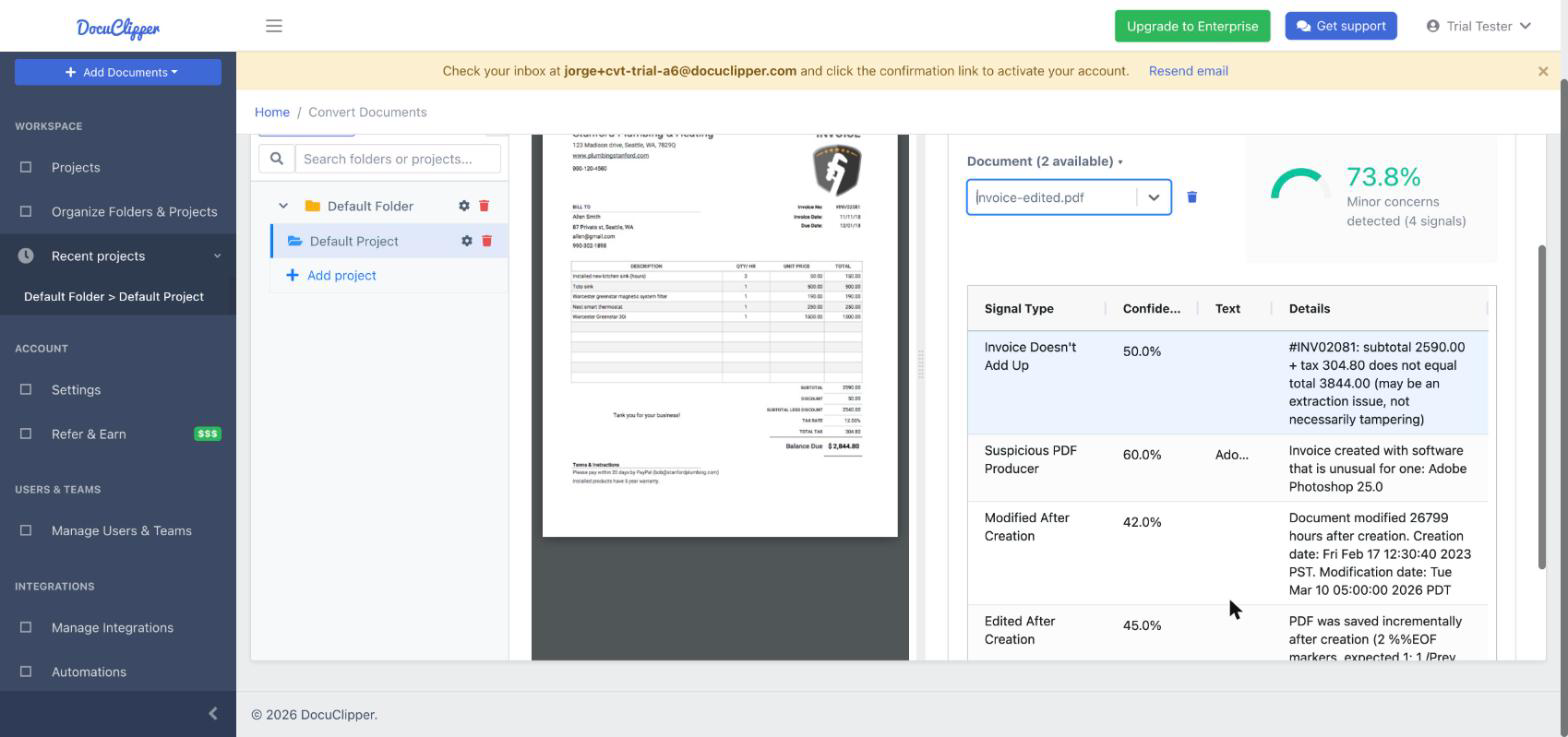
Sample fraud signal report
⚠ Edited after it was first saved
The PDF was saved incrementally after creation: content was appended on top of the original file.
⚠ Conflicting metadata
The document info names the bank's statement engine; the XMP record names Microsoft Word.
⚠ Inconsistent text height
Page 2: the amount “4,850.00” is 11.8pt tall; the rest of its row is 8.9pt.
Authenticity score
70 / 100
Minor concerns (3 signals)
OCR fraud detection
OCR Fraud Detection: Beyond Extraction
Generic OCR converts a document to text. That tells you what's on the page, not whether it's honest. DocuClipper pairs extraction with fraud checks, so the same project that gives you the data gives you an authenticity score, one click away in its Fraud Detection tab.
OCR isn't enough on its own. Extracting text doesn't tell you if the text was honest, so the fraud checks run on top of the extraction.
After extraction, DocuClipper checks the numbers it read: statement balances, invoice totals and pay stub math.
A pasted-in amount is reported with its page and position, so a reviewer knows exactly where to look.
Every signal is stored with its confidence and details, and a whole project's results download as one CSV for the review file.
Ask your AI assistant: connect DocuClipper to ChatGPT or Claude and ask whether a statement, invoice or pay stub looks edited.
Fraud Detection Software FAQs
DocuClipper checks bank and credit card statements, invoices and pay stubs for signs of tampering: PDFs edited after they were issued, metadata that disagrees with itself, producing software that is unusual for the document type, amounts pasted in at a different size, bank statement layouts that don't match the bank's known-authentic templates, and math that doesn't add up. Each document gets a 0-100 authenticity score and an itemized list of the signals behind it.
It flags the signs most edits leave behind. A statement re-saved in a PDF editor, made in a word processor or image editor, with conflicting metadata, with an amount pasted in at a different size, or whose transactions don't reconcile to the printed balances loses points. Statements are also matched against a library of known-authentic bank layouts. Several independent checks are harder to fool than one.
Yes. Lenders use DocuClipper to score the bank statements and pay stubs applicants submit before underwriting. Pay stubs are checked for net pay above gross pay, year-to-date figures below the current period, and withholding above the statutory rates, alongside the PDF edit and metadata checks.
Yes. Invoices are checked for PDF edits made after they were issued, image-editor producers, conflicting metadata, and totals that don't match the subtotal, tax and line items. Because vendors legitimately make invoices in Word, Excel and accounting software, those tools are not flagged on invoices.
A 0-100 score per document: 90 to 100 appears authentic, 70 to 89 has minor concerns, 50 to 69 is moderate risk and 0 to 49 is high risk. Each signal lowers the score by its weight times its confidence, and the full list of signals is shown with the score. The score is a risk signal to guide review, not a verdict.
Yes. Every signal is stored with its confidence and details, and the Download Project Fraud Report button exports the score and signals of every document checked in a project as a CSV for your underwriting, audit or case file.
Basic OCR converts a document to text or structured data. Fraud detection goes further: it checks that the extracted numbers are internally consistent, inspects the PDF's edit history and metadata, and produces an authenticity score, not just extracted data.