
For lenders, underwriting & tenant screening 4.7/5(124 reviews)Trusted by 10,000+ finance teams
Automated Income Verification from Bank Statements
Extract income, separate real earnings from transfers, refunds and loan proceeds, flag what needs a second look, and generate audit-ready summaries in minutes.
4.7/5(124 reviews)Trusted by 10,000+ finance teams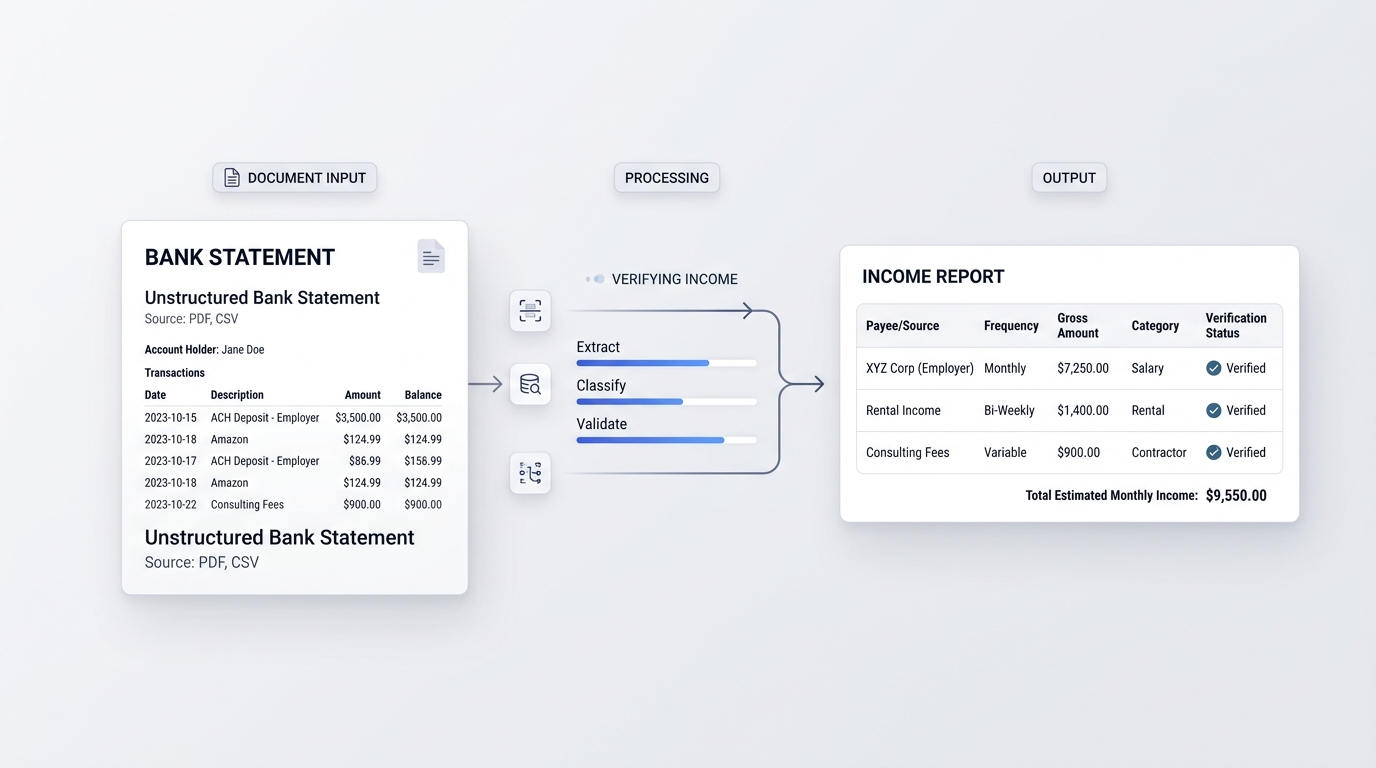
High-trust outputs for high-stakes decisions. See sample report
Built for income verification teams
138,000+
Bank and credit card statements converted in the 30 days to October 15, 2026
94.6%
Of digital statement periods tied to the printed balances
17 s
Median job time
Source: DocuClipper production data, bank and credit card statement jobs, 30 days to October 15, 2026. Tie-out is measured on digital PDFs.
Manual income verification is slow, inconsistent, and easy to miss
What slows teams down
- •Analysts spend hours scanning statements and calculating averages.
- •Inconsistent rules produce inconsistent decisions across reviewers.
- •Transfers between the applicant's own accounts get counted as income.
- •High volumes create bottlenecks that slow approvals and increase cost.
How DocuClipper fixes it
- Extract structured transactions from statements automatically.
- Generate consistent monthly income summaries, month by month.
- Separate income sources (payroll, gig, benefits, transfers) for cleaner review.
- Flag one-off deposits and missing statements, with a clear audit trail.
See a sample income verification report
A clear summary for decisions, plus the transaction trail you need for QA and audits.
Monthly income summary
Average monthly income$6,420
Recurring monthly income$5,227 (payroll)
Primary sourcePayroll (recurring)
Income sources
- Payroll, recurring deposits with stable cadence
- Gig income, irregular but consistent monthly presence
- Transfers, separated from “real income”
Flagged for review
- Statement missing for one month
- Large one-off deposit to explain
- NSF fees and days below zero
- Lowest authenticity score in the file
Underwriting a non-QM or bank statement loan from 12 or 24 months of statements? See how the bank statement loan income calculation works.
Everything you need for fast, reliable income verification
Purpose-built for enterprise teams that need speed, consistency, and defensible outputs.
Minutes per file, not hours
Turn multi-month bank statements into structured income summaries fast, without manual scanning, copy/paste, or spreadsheets.
Consistent income calculations
Standardize how your team computes averages, trends, and pay-period normalization so decisions are repeatable across reviewers.
What is not income is left out
Transfers between the applicant's own accounts, deposits returned unpaid, loan proceeds, refunds and card credits are excluded, each with its reason, and large one-off deposits are listed so you can ask about them.
Audit-ready traceability
Every number ties back to underlying transactions for defensible underwriting decisions and easier QA and compliance review.
Exports and API-friendly outputs
Export the income report as CSV and every transaction as Excel or CSV, or pull converted transactions through the API.
Missing months called out
A month with no statement for an account is named, highlighted and left out of the average, so a gap in the file never drags the monthly figure down.
Built for lenders, property managers, and fintech
Make faster decisions while improving consistency and reducing fraud and exceptions.
Lenders & underwriting
- · Standardize income calculations
- · Reduce time-to-decision
- · Improve audit defensibility
Tenant screening
- · Verify income faster
- · Reduce fraud risk
- · Handle high volume consistently
Fintech / BNPL
- · Structured outputs for decision engines
- · Real-time validations
- · API-driven workflows
Manual review vs. automated income verification
Replace spreadsheet workflows with consistent, scalable outputs.
| Feature | DocuClipper | Manual review |
|---|---|---|
| Time to verify income | Minutes per applicant file | 1–2 hours per file |
| Consistency across reviewers | Standardized calculations and outputs | Varies by analyst and process |
| Transfers and non-income deposits | Excluded automatically, each with its reason | Picked out by hand, easy to double-count |
| Audit defensibility | Transaction-level traceability | Manual notes and spreadsheets |
| Scale with volume | Throughput increases without headcount spikes | Limited by reviewer capacity |
What Customers Say
Real reviews from accountants, bookkeepers, and finance teams.
“DocuClipper has helped us eliminate several manual data entry processes, saving us a lot of time.”
KR
Kristin Mitchell
Accounting, United States
“It's a complete game-changer. Instead of spending hours combing through statements, we get the data we need almost instantly.”
MA
Matt
Lending, United Kingdom
“DocuClipper allowed us to enhance our advisory services, directly impacting our bottom line.”
SA
Sarah Winship
Accounting, United Kingdom
Verify income from bank statements in seconds. Start your free 14-day trial.
Start free trialIncome verification FAQs
DocuClipper extracts every transaction from the statement PDFs, leaves out transfers between the applicant's own accounts, refunds, loan proceeds and credit card credits, and groups the remaining deposits by payer. The Income view shows average monthly income, recurring monthly income, each source's cadence, large one-off deposits and a month-by-month table, and every deposit can be traced to its statement line.
Yes. Deposits paired with a withdrawal of the same amount from another account in the project within 5 days, or described as coming from the holder's own savings or checking, are left out as transfers. A payer who paid at least 3 times on a weekly, every-2-weeks, twice-monthly, monthly or quarterly schedule is a recurring source; large deposits from no regular source are listed as one-offs.
Most lenders request 2-3 months of statements for standard income verification and 12-24 months for self-employed borrowers on bank statement loans. DocuClipper processes any number of months in one project and reports income across the full period, month by month. For the non-QM calculation, see our bank statement loan income page.
Large one-off deposits worth at least a quarter of monthly income, months with a missing statement, recurring sources that stopped paying before the last statement, and statement periods that do not tie out to their printed balances. On Business plans and in the trial, each statement also gets a 0 to 100 authenticity score. The Risk flags view adds NSF and overdraft fees counted per month, returned items, days the balance ended below zero, the low and average daily balance, how much monthly income swings, and daily or weekly debits to other lenders.
Yes, in Advanced Analysis > Risk flags. NSF, returned-item and overdraft fees are counted and totaled per month from the transaction descriptions, and a row such as NSF FEE 210.00 on an account that charges $35 counts as six fees. Days below zero come from the end-of-day balance of every statement day: the running balance the statement prints where it has one, otherwise the opening balance plus the transactions, and the report says which it used. It also shows the low and average daily balance per month, deposit volatility, and daily or weekly debits to merchant cash advance funders and other lenders as possible existing advances. Everything exports to CSV.
Yes. Every excluded deposit is listed with the rule that excluded it, and transfer pairs you reject in the Transfers tab count as income again. Your own policy rules, such as payroll-only income or an expense factor, are applied to the exported figures by your team.
Yes. Export the income report as CSV and the transactions as Excel or CSV to attach to the loan or tenant file. There is no built-in LOS connector; the DocuClipper API and webhooks deliver converted transactions as JSON to your own systems.