
Credit card statement OCR + expense extraction 4.7/5(91+ reviews)Trusted by 10,000+ finance teams
Extract and categorize expenses from credit card statements automatically
Convert credit card statements into clean, structured expense data for bookkeeping, analysis, and accounting workflows, no manual entry required.
4.7/5(91+ reviews)Trusted by 10,000+ finance teams14-day free trialNo credit card required
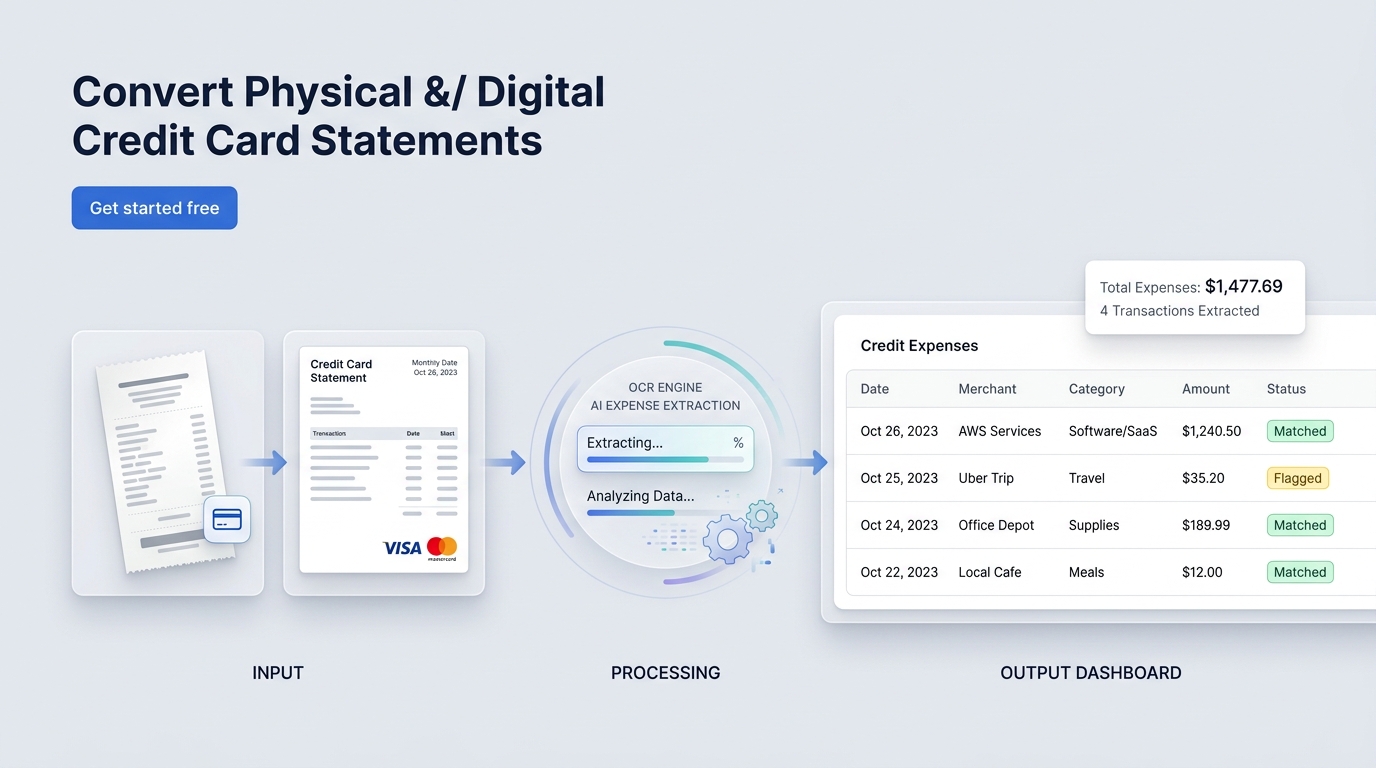
From statement PDF → expense table → categories and exports.
Quick value props
Purpose-built for expense workflows: extraction, cleanup, categorization, and export.
Works with any issuer format
Handle statement layout differences across card brands, issuers, and time periods.
Extract credit card transactions automatically
Turn statement lines into a clean expense table you can reconcile and report on.
Categorize spend (AI-assisted)
Group by merchant, vendor, expense type, or custom rules for your chart of accounts.
Handles scans and images
Credit card statement OCR that works on scans, photos, and low-quality exports.
What is a credit card statement?
A credit card statement summarizes charges, payments, and balances for a billing period. Teams use credit card statement OCR to extract transaction lines, then structure them for expense reporting, bookkeeping, audits, and tax prep. DocuClipper turns statements into tables you can use in Excel, QuickBooks, Xero, or custom workflows.
Need cash flow, income verification, or flow-of-funds analysis instead? See bank statement data extraction.
Credit card statements create expense chaos
Merchant names vary and are hard to normalize
Manual categorization is slow and inconsistent
Messy PDFs and scans break standard converters
Hard to track recurring subscriptions and vendor spend
DocuClipper turns credit card statements into expense-ready data
Extract transactions, normalize merchant names, and generate clean outputs you can import or analyze.
1
Upload statements
PDFs, scans, and images.
2
Extract expense lines
Date, merchant, amount, fees.
3
Categorize & export
Excel/CSV, summaries, or imports.
Use AI prompts to categorize and summarize spend
Extract what you need in plain English: categories, vendor groupings, recurring subscriptions, monthly totals, and more.
Invoice extraction
Paste the prompt, upload documents, and export the structured output.
Prompt
Extract vendor name, invoice number, total amount, due date.
Output (example)
| Vendor | Invoice # | Total | Due date |
|---|---|---|---|
| Acme Supplies LLC | INV-10492 | $3,218.40 | 2026-02-15 |
| Northwind Office | A-8821 | $468.00 | 2026-02-20 |
| BrightStar Freight | FRT-773 | $1,029.12 | 2026-02-28 |
Use cases (pick your workflow)
Route extracted credit card transactions into the workflow you care about most.
Credit card statement converter
Convert PDFs to Excel/CSV and structured outputs.
Open converter →
Bookkeeping automation
Standardize transactions for monthly close and reconciliations.
Financial document automation →
Invoice processing
Combine statement and invoice workflows for clean books.
Invoice processing →
QuickBooks and Xero workflows
Export and import data for your accounting system.
QuickBooks workflows →
Transaction categorization
Categorize, group by vendor, and build spend summaries.
Categorization feature →
Need bank-level analysis?
Income verification, cash flow, investigations, and more.
Bank statements hub →
Why use DocuClipper for credit card statement OCR
Manual expense tracking vs automated extraction + categorization
| Feature | DocuClipper | Manual process |
|---|---|---|
| Review & categorize expenses | Automated extraction + AI prompts | Manual cleanup |
| Accuracy | Consistent tables across formats | Missing/duplicated lines |
| Speed | Minutes per statement batch | Hours of copy/paste |
| Scaling | Bulk processing | Limited by headcount |
Social proof
“We turned credit card statements into categorized expense reports in minutes.”
Less cleanup, clearer spend reporting, and faster monthly close.
What Customers Say
Real reviews from accountants, bookkeepers, and finance teams.
“DocuClipper has helped us eliminate several manual data entry processes, saving us a lot of time.”
KR
Kristin Mitchell
Accounting, United States
“It's a complete game-changer. Instead of spending hours combing through statements, we get the data we need almost instantly.”
MA
Matt
Lending, United Kingdom
“DocuClipper allowed us to enhance our advisory services, directly impacting our bottom line.”
SA
Sarah Winship
Accounting, United Kingdom
Extract credit card statement data automatically. Start your free 14-day trial.
Start free trialFAQ
Answers for common credit card statement OCR and expense extraction questions.
DocuClipper supports credit card statement PDFs, scanned PDFs, and images from any major card issuer. If you can view the statement, we can typically extract the transaction lines into structured data.
DocuClipper works with statements from all major issuers including American Express, Chase, Visa, Mastercard, Discover, Capital One, Citi, and Bank of America. It also handles statements from regional banks and credit unions. No issuer-specific setup is required, the AI adapts to each layout automatically.
Yes. DocuClipper uses built-in OCR to extract transaction lines from scanned PDFs and photographed statements. Accuracy is highest on digital PDFs downloaded directly from the issuer, but scanned statements extract cleanly in most cases.
Yes. After extraction, you can apply AI prompts to categorize spend by merchant type, label recurring charges, flag unusual transactions, and generate expense summaries for bookkeeping, reporting, or tax prep.
Yes. Export transactions to Excel or CSV for manual import, or use the QuickBooks and Xero integrations to push credit card transactions directly as expenses. The exported format includes date, description, amount, and category columns.
Yes. Upload a ZIP of statement PDFs or a multi-page PDF and DocuClipper processes each statement separately, then outputs a combined spreadsheet. This is useful for reconciling multiple cards across a team or for clients who carry several cards.
Bank statements are primarily used for cash flow analysis and income verification. Credit card statements are primarily used for expense tracking, categorization, and vendor-level spend analysis. The extracted fields are the same (date, description, amount), but credit card workflows typically focus on expense coding rather than cash position.