
Invoice OCR 4.7/5(117+ reviews)Trusted by 10,000+ finance teams
Invoice OCR: How DocuClipper Reads Invoices
Feature deep-dive on the OCR engine that powers DocuClipper's invoice scanning. Reads vendor details, invoice numbers, totals, taxes, and full line-item tables from any PDF or scanned invoice with 99% accuracy. No templates. Looking for the buyer page? See Invoice Scanning Software.
4.7/5(117+ reviews)Trusted by 10,000+ finance teams14-day free trialNo credit card required
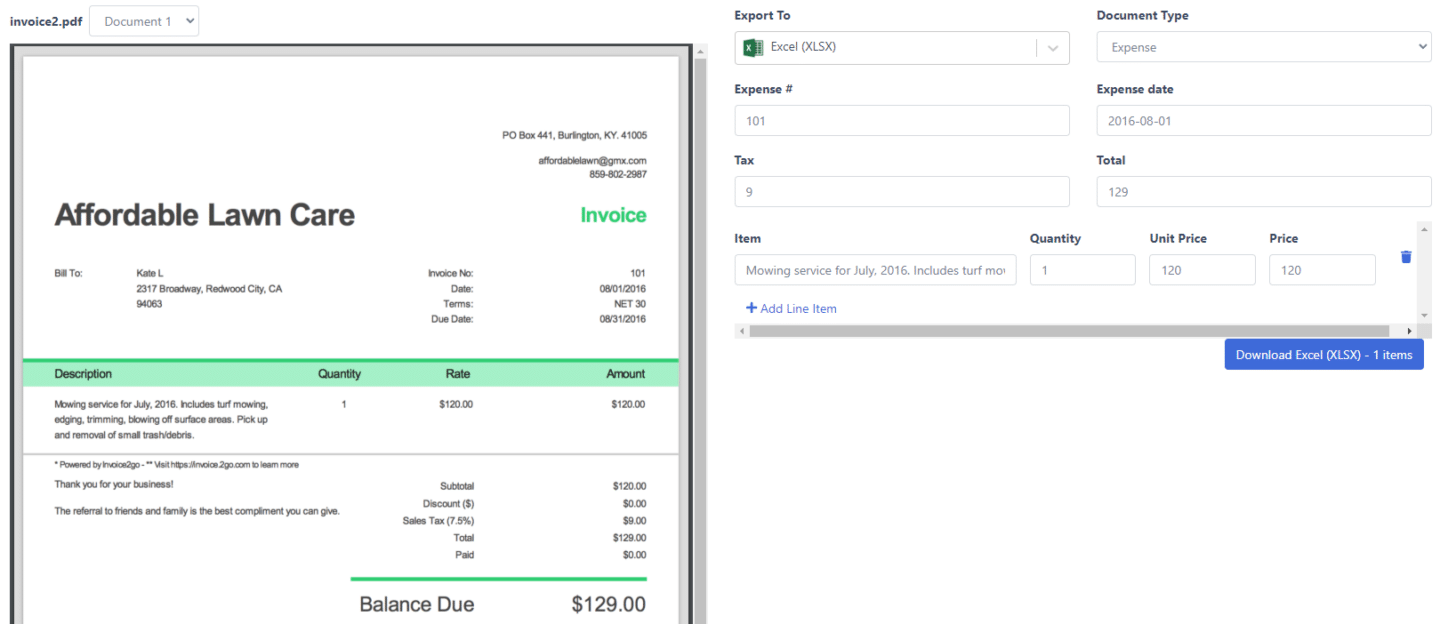
Trusted by 10,000+ Accounting, Lending, and Finance Professionals










What Invoice OCR does
- Reads PDF, scanned, and photographed invoices, digital or image-based.
- Extracts vendor name, invoice number, dates, totals, taxes, and payment terms.
- Captures full line-item tables: descriptions, quantities, unit prices, and totals.
- Works across mixed vendor layouts without templates or training.
- Exports structured data to Excel, CSV, QuickBooks, Xero, or your API.
How Invoice OCR works
Four steps, from raw PDF to Excel-ready data.
→
Upload invoices
Drag and drop PDFs, scans, or photos. Bulk upload, email sync, and API ingestion supported.
→
Recognize layout
Detects headers, totals, and line-item tables across any vendor format, no templates.
→
Extract structured fields
Captures vendor, invoice number, dates, subtotals, taxes, and full line-item tables.
Export or route
Send clean data to Excel, QuickBooks, Xero, Google Sheets, or an approval workflow.
What makes DocuClipper Invoice OCR different
Built for accounting and AP workflows, not generic document OCR.
Line-item table extraction
Captures full line-item tables, descriptions, quantities, unit prices, and row totals, not just header fields.
No templates required
Works on unseen vendor layouts out of the box. No per-vendor setup, no training data.
Totals & tax validation
Cross-checks subtotal + tax against invoice total and flags mismatches before export.
Multi-currency & multi-language
Reads invoices in multiple currencies and languages, preserving the source formatting.
Workflow-ready output
Exports directly to QuickBooks, Xero, Excel, Google Sheets, or via API/webhooks to your ERP.
SOC 2 & enterprise-grade security
AES-256 encryption, role-based access, and full audit logs. Your invoice data stays protected.
Every field, captured automatically
DocuClipper Invoice OCR extracts header fields and line-item tables in one pass.
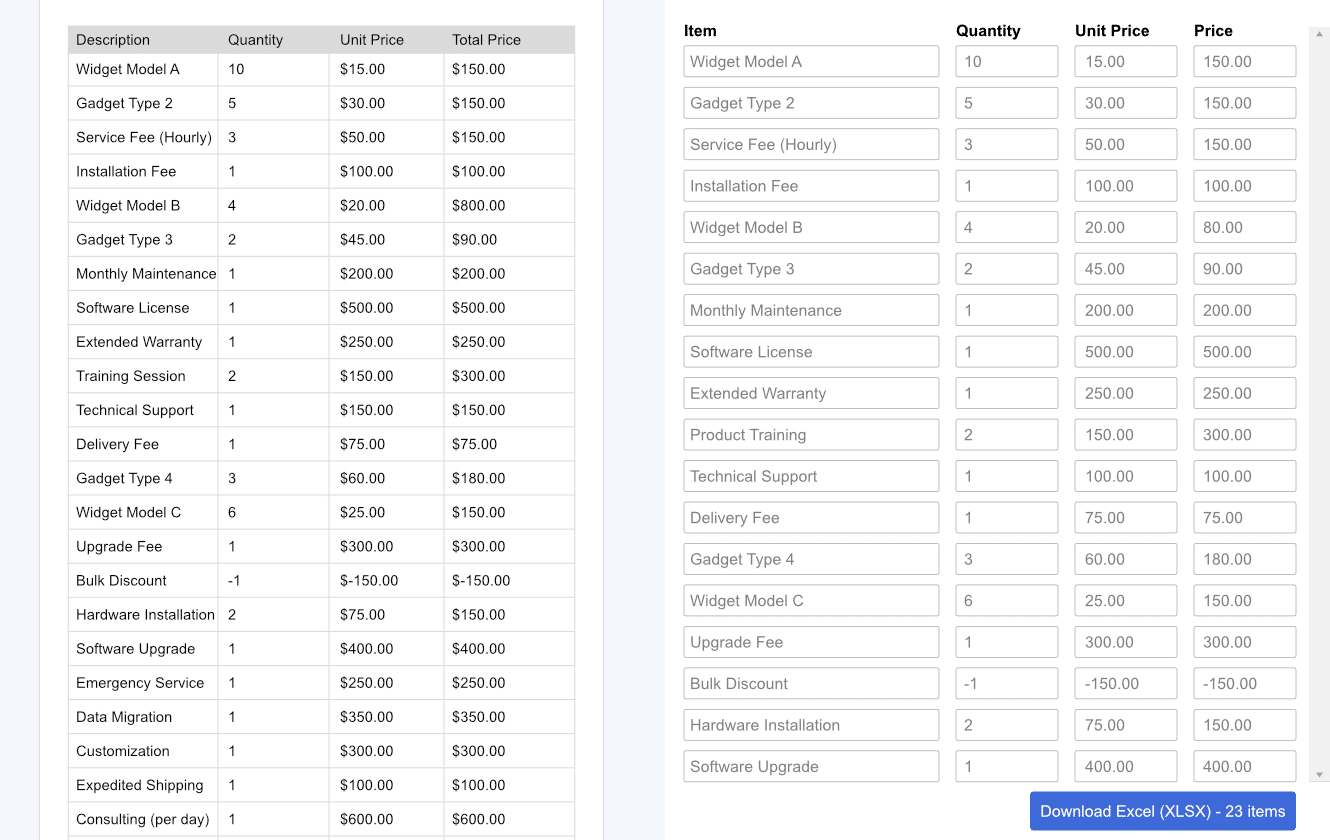
Line-item extraction, descriptions, quantities, and unit prices
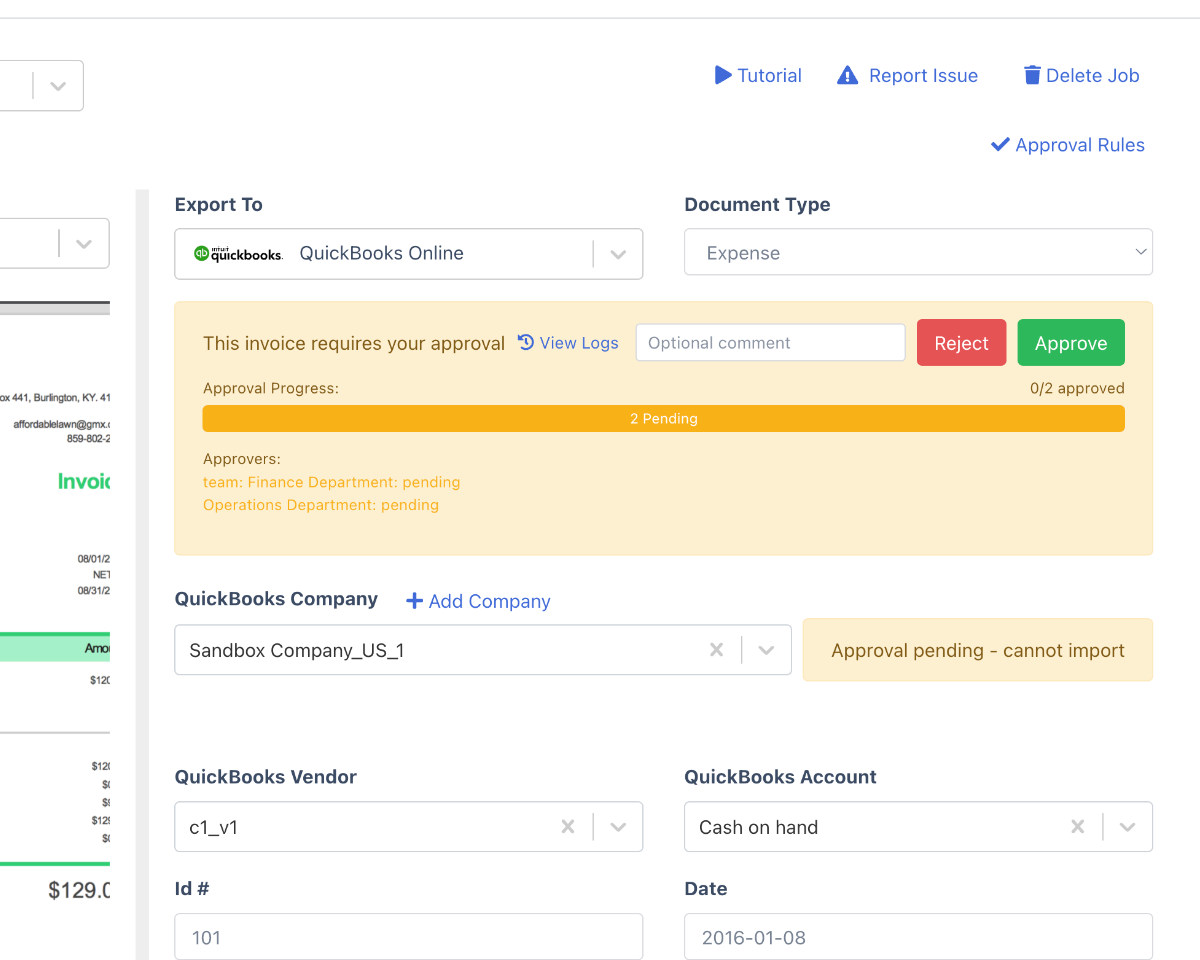
Send extracted data straight into approval routing
| Field | DocuClipper Invoice OCR | Generic OCR tools |
|---|---|---|
| Vendor name & address | Structured fields | Raw text blob |
| Invoice number & dates | Structured fields | Often merged with text |
| Subtotal, tax, total | Validated & cross-checked | Extracted but not validated |
| Line-item table | Full rows with qty & price | Table cells lost or mis-aligned |
| Multiple vendor layouts | No templates needed | Template per vendor |
Who uses Invoice OCR
Accounts payable teams
- Eliminate manual invoice keying at scale.
- Route extracted invoices into approval workflows.
- Reduce processing cost per invoice by 80%.
Accountants & bookkeepers
- Pull vendor invoices straight into QuickBooks or Xero.
- Capture line items for accurate account coding.
- Process invoices for multiple clients from one dashboard.
Finance teams & ERPs
- Feed extracted invoice data into NetSuite, SAP, or Dynamics 365.
- Validate totals and taxes before posting.
- Close month-end faster with fewer reconciliation errors.
What Customers Say
Real reviews from accountants, bookkeepers, and finance teams.
“DocuClipper has helped us eliminate several manual data entry processes, saving us a lot of time.”
KR
Kristin Mitchell
Accounting, United States
“It's a complete game-changer. Instead of spending hours combing through statements, we get the data we need almost instantly.”
MA
Matt
Lending, United Kingdom
“DocuClipper allowed us to enhance our advisory services, directly impacting our bottom line.”
SA
Sarah Winship
Accounting, United Kingdom
Ready to try it? Start your free 14-day trial, no credit card required.
Start free trialRelated features & workflows
Template-free invoice extraction
How DocuClipper reads any vendor invoice on first upload — no templates, no training.
Learn moreInvoice processing software
Full invoice workflow: extraction, PO matching, approvals, and export.
Learn moreInvoice approval software
Route extracted invoices through approval workflows before posting.
Learn moreBest invoice parser (guide)
How to evaluate invoice parsers for accuracy, line-item depth, and accounting integrations.
Learn moreAccounts payable OCR
AP-focused OCR for high-volume invoice processing workflows.
Learn moreInvoice to QuickBooks
Import extracted invoice data into QuickBooks Online or Desktop.
Learn moreReceipt OCR
Extract merchant, total, tax, and line items from receipts.
Learn moreBest OCR for invoice processing
Why DocuClipper Is the Best OCR Software for Invoice Processing
Generic OCR converts images to text. Best-in-class invoice OCR returns structured data your accounting system can actually consume — vendor, dates, taxes, full line-item tables — and validates it before export. Five reasons DocuClipper outperforms general-purpose OCR on invoices specifically. For buyer features, plans, and pricing, see our best invoice OCR software page.
99% accuracy on invoice fields
Vendor, invoice number, dates, subtotal, tax, total, and line items extracted with 99% field-level accuracy on typical vendor invoices.
Reconciliation built in
Line-item totals must tie to invoice subtotal/tax/total before the invoice can post — bad math is flagged automatically.
No per-vendor templates
Reads invoices from vendors it has never seen before. Layouts vary; the model generalizes.
Bulk + automated ingestion
Process hundreds of invoices in one upload, or auto-ingest from email forwarding, Google Drive, or REST API.
Export-ready output
Direct push to QuickBooks, Xero, NetSuite, Sage, or Excel — not just raw text. Categories, payees, and totals preserved.
Audit-ready trail
Every extraction logged with confidence scores; low-confidence fields flagged for human review automatically.
AI invoice OCR
AI Invoice OCR
AI is what lets one OCR engine handle every vendor format on the planet. Trained on millions of real invoices, the model recognizes vendor, totals, and line items on layouts it has never seen — and learns from corrections so it gets better with every invoice you process.
- Generalizes across vendor layouts — no setup per vendor.
- Confidence-scored fields flag low-certainty extractions for human review.
- Adapts to layout changes automatically when vendors redesign their invoice template.
- Combines OCR with field-level validation (totals tie to subtotals + tax) so output is accounting-ready.
AI vs template OCR
Template OCR (legacy)
Per-vendor field maps. Setup time per vendor. Breaks when vendors redesign their invoice. Maintenance never ends.
DocuClipper AI Invoice OCR
Reads any vendor invoice it has never seen. Zero per-vendor setup. Learns from corrections. Layout-change resilient.
OCR invoice scanning
OCR Invoice Scanning Software
Five ingestion paths so invoices flow into the OCR pipeline however your team works today.
Email forwarding
Send any invoice to a dedicated inbox; OCR runs immediately.
Bulk PDF upload
Drop a folder of invoices in the browser; processed in parallel.
Google Drive watch
New invoices in a synced folder are scanned automatically.
Mobile capture
Photograph paper invoices in the field; OCR handles low-quality scans.
REST API
POST invoices programmatically from any system that touches AP.
Invoice OCR FAQs
Invoice OCR software reads invoice PDFs, scans, and photos and converts them into structured fields, vendor name, invoice number, dates, subtotals, taxes, totals, and line-item tables, ready to import into accounting systems like QuickBooks, Xero, or Excel.
Yes. DocuClipper Invoice OCR captures full line-item tables: descriptions, quantities, unit prices, and row totals, from single-page or multi-page invoices in any vendor layout.
No. DocuClipper works on unseen vendor layouts out of the box. Unlike template-based OCR tools, no per-vendor configuration is required.
PDF (digital or scanned), JPG, PNG, TIFF, and photos of paper invoices. Multi-page invoices and bulk uploads are supported.
DocuClipper Invoice OCR extracts invoice data with around 99% accuracy on typical vendor invoices. Totals and taxes are cross-validated against subtotals before export so errors are flagged automatically.
You can export to Excel, CSV, QuickBooks (QBO or Online), Xero, Google Sheets, or send data via API and webhooks into any ERP such as NetSuite, SAP, or Dynamics 365.
Yes. Bulk uploads, email ingestion, Google Drive sync, and API ingestion are supported so you can process hundreds of invoices at once.
Invoice OCR is the data-extraction step, turning the PDF into structured fields. Invoice scanning software bundles OCR with bulk upload, vendor mapping, approval routing, and accounting-system export. DocuClipper provides both: this page covers the OCR engine; see /solutions/invoice-scanning-software/ for the full buyer page, or /solutions/accounts-payable-automation-software/ for purchase-order matching and approvals.