
Bank statement reconciliation 4.7/5(117+ reviews)Trusted by 10,000+ finance teams
Bank Statement Reconciliation After OCR Extraction
Reconcile extracted bank statement data: match transactions to statement totals, flag gaps, and export with confidence. Complements OCR extraction—not a substitute for the main bank statement converter hub.
4.7/5(117+ reviews)Trusted by 10,000+ finance teams14-day free trialNo credit card required
Trusted by 10,000+ Accounting, Lending, and Finance Professionals










What this feature does
- Compares extracted transactions to statement totals.
- Detects discrepancies between line items and balances.
- Validates completeness so your exported data is trustworthy.
How it works
→
Extract transactions
Turn bank statement PDFs/scans into clean transaction rows.
→
Sum & normalize totals
Standardize amounts and ensure statement-level totals are comparable.
Reconcile & flag issues
Match totals and highlight missing, incorrect, or inconsistent data.
What makes it better
Validation-first accuracy
Unlike basic OCR tools, reconciliation checks confirm data completeness.
Rules you can trust
Deterministic checks make outcomes auditable and repeatable.
Discrepancy detection
Spot mismatched balances, unusual patterns, and extraction gaps quickly.
Reconciliation sample
A clear match/mismatch signal so you know what’s safe to export.
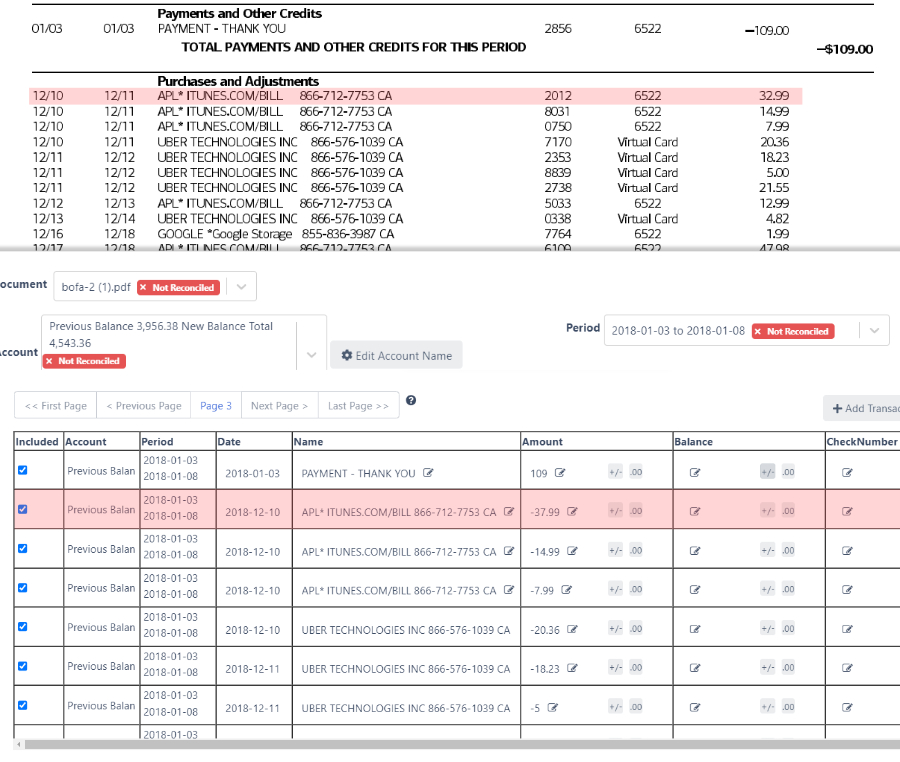
Accuracy check, totals matched
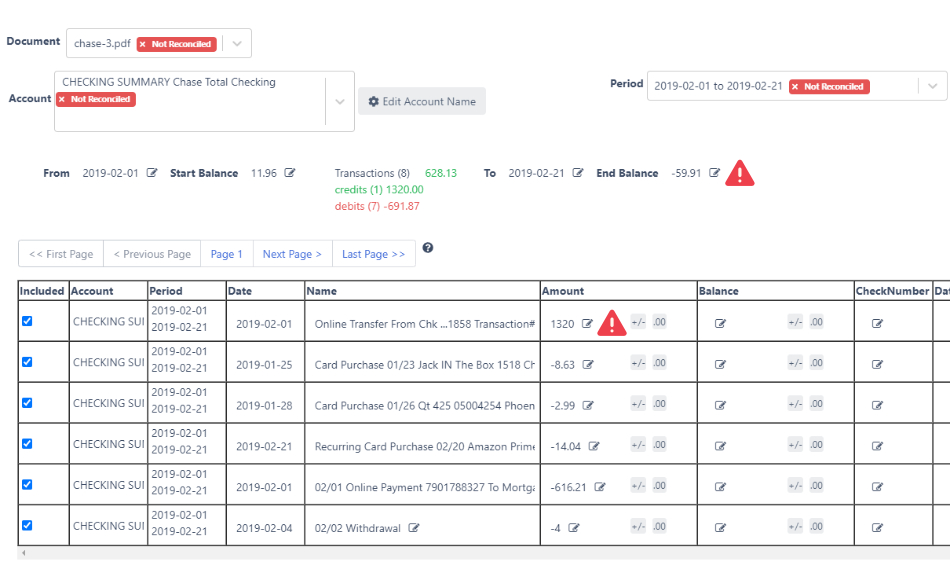
Discrepancy flagged, statement does not reconcile
| Check | DocuClipper result | Manual review |
|---|---|---|
| Statement totals match | Match (green check) | Uncertain until reviewed |
| Missing/incorrect lines | Flagged for review | Often missed |
Use cases
Accountants & bookkeepers
- Reconcile faster with fewer missing lines.
- Catch statement/balance mismatches early.
- Export only validation-complete data.
Lenders & underwriting teams
- Verify cashflow data consistency before decisions.
- Reduce risk from incorrect extraction.
- Audit discrepancies across many statements.
Financial investigators
- Surface anomalies and reconciliation gaps.
- Identify suspicious inconsistencies.
- Support review with deterministic validation signals.
What Customers Say
Real reviews from accountants, bookkeepers, and finance teams.
“DocuClipper has helped us eliminate several manual data entry processes, saving us a lot of time.”
KR
Kristin Mitchell
Accounting, United States
“It's a complete game-changer. Instead of spending hours combing through statements, we get the data we need almost instantly.”
MA
Matt
Lending, United Kingdom
“DocuClipper allowed us to enhance our advisory services, directly impacting our bottom line.”
SA
Sarah Winship
Accounting, United Kingdom
Ready to try it? Start your free 14-day trial, no credit card required.
Start free trialRelated features
Bank statements (convert & export)
Primary hub for statement conversion before reconciliation.
Learn moreBank statement OCR
Technical overview of OCR and parsing on PDFs and scans.
Learn moreTransaction categorization
Rules + AI categorization with deterministic control.
Learn moreInvoice OCR
Vendor + totals + extraction foundations for AP.
Learn moreBank statement analysis
Turn reconciled transactions into insights and flags.
Learn moreBank statement reconciliation FAQs
DocuClipper extracts every transaction from a bank statement PDF or scan, sums deposits and withdrawals, and compares the totals to the statement's declared opening and closing balances. When the math matches, the statement is marked reconciled; when it doesn't, the mismatch is flagged so you can review before exporting.
Three per-account, per-period checks: (1) opening balance + deposits − withdrawals = closing balance, (2) every transaction row has a date, description, and amount, (3) extracted totals align with the statement's summary section. Any check that fails surfaces as a discrepancy on the conversion screen.
Yes. Statements that don't reconcile, where stated balances don't match the sum of transactions, are one of the strongest signals of tampering. The Bank Statement Analyzer surfaces this alongside other fraud signals for lenders and forensic accountants.
Reconciliation is format-agnostic: it runs on any bank or credit-card statement DocuClipper can extract, including PDFs, scans, and image-based statements. The check is math-based (opening + deposits − withdrawals = closing), so it works across US and international banks without per-bank templates.
Yes. Once a statement reconciles, the validated transactions export to QuickBooks Online or Desktop (via QBO file), Xero, Excel/CSV, Sage, and other accounting systems. Exporting only from reconciled statements prevents partial or corrupted data from entering your books.
The UI flags the specific discrepancy, missing line, incorrect amount, or an OCR error, and lets you edit transactions in place until totals match. Nothing exports until you choose to; the reconciliation result is a gate, not a blocker.
It runs automatically on every bank statement extraction. There are no rules, templates, or mappings to configure: DocuClipper uses the statement's own summary section as the source of truth for totals.